Document added to vault
Trigger
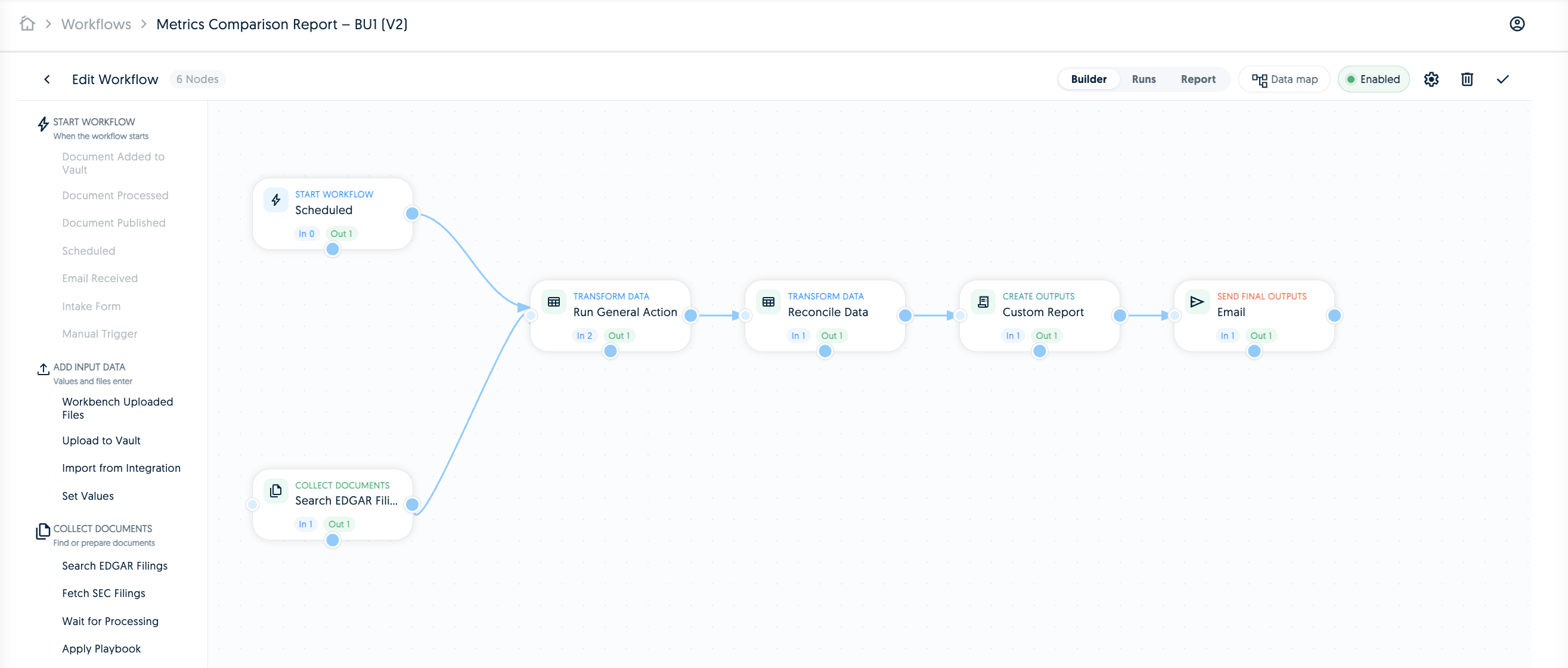
Start when a document or attachment is added to a governed vault.
Document processed
Trigger
Run once extraction, classification, and processing are complete.
Document published
Trigger
React when a document reaches a published or approved state.
Email received
Trigger
Start from inbound email bodies, metadata, and attachments.
Intake form
Trigger
Collect files and structured inputs from business submitters.
Scheduled run
Trigger
Run recurring checks over selected documents, entities, or portfolios.
Manual trigger
Trigger
Launch an on-demand workflow from Workbench or a saved process.
Confidence
Condition
Route documents by extraction confidence, thresholds, and exceptions.
Document type is
Condition
Branch work by agreement, filing, invoice, policy, or custom type.
Entity contains
Condition
Check whether extracted fields contain expected values or signals.
AI logic
Condition
Evaluate natural-language routing rules with document evidence.
Decision policy matrix
Condition
Apply ordered policy rules, default decisions, and exception paths.
AI review
AI and review
Validate, reject, or explain extracted tags using instructions.
Run general action
AI and review
Produce labeled analysis outputs for downstream workflow steps.
Apply playbook
AI and review
Run reusable review criteria and generate structured outputs.
Run on-demand agent
AI and review
Trigger a saved agent and capture its report in the workflow.
Add reviewer or assignee
Routing
Assign owners when documents need action, validation, or resolution.
Request approval
Routing
Pause until approvers approve, reject, or comment on an output.
Create task or reminder
Routing
Create follow-up tasks, reminders, and alerts for operational teams.
Set values
Data pipeline
Seed static inputs or controlled values for later workflow steps.
Organise values
Data pipeline
Extract, normalize, deduplicate, and format values for use.
Calculate values
Data pipeline
Apply formulas, thresholds, precision rules, and currency context.
Reconcile data
Data pipeline
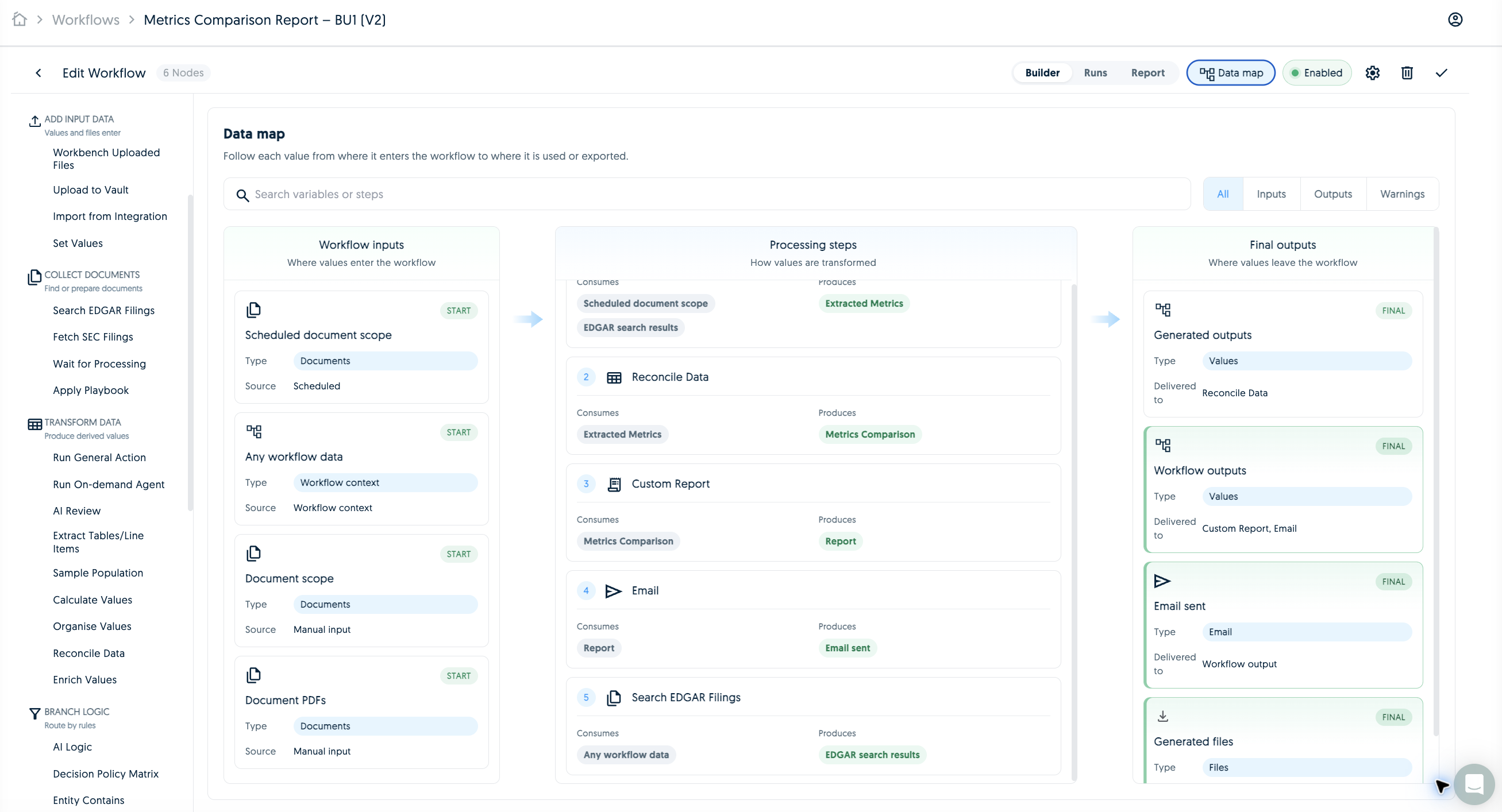
Compare sources and report breaks, mismatches, or variances.
Compare to accepted output
Data pipeline
Check generated output against approved answers, templates, or files.
Enrich values
Data pipeline
Add external context from web, news, or source systems.
Lookup record
Records
Find existing business records before creating or updating data.
Create or update record
Records
Maintain governed records linked back to workflow evidence.
Workbench uploaded files
Document intake
Use files attached in Workbench as workflow inputs.
Upload to vault
Document intake
Store inbound attachments and outputs in a workflow vault.
Extract text
Document intake
Extract plain text from submitted documents for analysis.
Wait for document processing
Document intake
Pause until documents are ready for downstream analysis.
Search EDGAR filings
Public sources
Search SEC filing text for companies, forms, and topics.
Fetch SEC filings
Public sources
Import the latest filings for companies in scope.
Extract tables or line items
Document intelligence
Capture tables, schedules, invoice lines, and structured rows.
Fill spreadsheet or form
Reports and outputs
Populate uploaded templates with workflow data.
Report from template
Reports and outputs
Generate reports from approved templates and workflow evidence.
Custom report
Reports and outputs
Generate a report from a prompt, selected facts, and source context.
Submit to integration
Delivery
Send artifacts to SharePoint, ServiceNow, or connected systems.
Import from integration
Delivery
Pull records and attachments from connected systems into TextMine.
API request
Delivery
Call external REST APIs and save structured responses.
Webhook
Delivery
Send outbound HTTP callbacks when workflow milestones occur.
Tableau export
Delivery
Export Tableau views or workbooks for reporting workflows.
Power BI export
Delivery
Export Power BI reports for analytics and control packs.
Send email
Delivery
Notify users, senders, submitters, or business teams with context.
Submit to Legislate
Delivery
Publish documents into Legislate with the latest validated context.